Printed codes
A code on a table does more than a link in a speech
The settings to fix before anything is printed, how four table stands come off one sheet of paper, where to place them so they get scanned, and the ten-second test almost everyone skips.
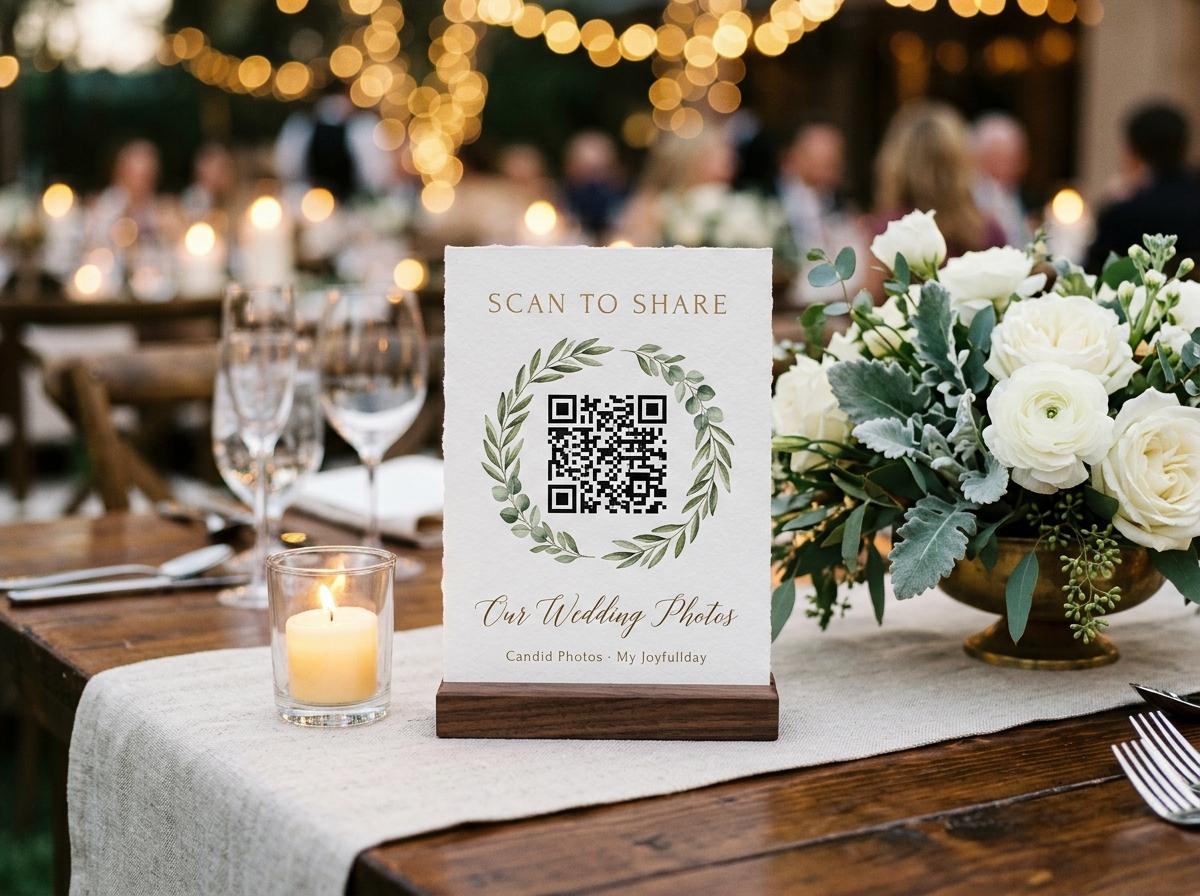
A printed code solves the one problem a shared link cannot. Typing an address from memory, in a room, on a phone at twelve percent, is the point at which guests give up — not because they dislike you, but because they have no idea what the characters were. A code removes the typing entirely: the camera app on every phone made in the last six years opens it, and the upload page is in front of them in two seconds. It is also the part of this that people fear unnecessarily. There is nothing to design, no generator to subscribe to, and no code to keep alive on somebody else's server, because the code points at the address your collection already has. What follows is the whole of it: set the collection up properly first, print the sheet, place the cards where the phones actually are, and test one before a hundred people arrive.
Fix the settings before the paper exists
This is the order people get wrong. They make a code from a collection that is still half-configured, print ninety cards, and then change the thing the cards point at. The address itself never changes, so a settings revision is free — but the guest experience on the other side of the scan is what the printed card has promised, and it is worth settling first.
Create the collection with the real event date
Choose the occasion, give it the name guests will see, and set the date, because the time a collection stays online counts from that date rather than from the day you created it. A code printed for the fourteenth should not lead to a collection that closes before the fourteenth.
Write the line every contributor reads first
The page carries a short call to action above the code on the printed card, and the collection has its own welcome text. Both are worth changing from the default: one line naming what you hope to see beats an invitation to share memories.
Choose whether the gallery can be browsed
Open, so guests see one another's photographs, or upload-only, so they send into a collection they cannot scroll. For a wedding the open setting is almost always right; the moment somebody projects the gallery on a screen, you may wish you had chosen otherwise, so decide deliberately.
Decide whether entries are reviewed first
A switch on the collection settings, and it starts off. With it off, contributions go straight into the gallery and onto the room's screen — which is delightful at a wedding of people who know each other and less so when a projector is showing the room to strangers.
Check what the plan takes
Photographs and clips have separate ceilings, and the free collection holds twenty of the first, ten contributing guests, nothing moving, and comes down in a week. A code printed on paper should not point at a rehearsal.
Printing four stands from one sheet
Open the print view in the dashboard
The code is generated from your own collection's address, and the layout puts four table cards on one A4 sheet. An ordinary printer and ordinary paper is the intended setup, partly so a reprint is cheap.
Print two sheets, not one
One sheet covers twenty tables and never survives the day at full strength. The spare is for the tear, the drink, the one that ends up in a coat pocket, and the friend who asks for a copy to take home.
Fold them so they stand up
A card lying flat on a table is read by nobody and scanned by almost nobody. Folded into a tent it faces the far side of the table, which is the only orientation that works from a seated position across a plate.
Reprint rather than improvise
A code is the one URL that cannot be corrected after printing, so if the wording is wrong, print the sheet again in five minutes. The worst version of this is a hand-written address on the back of a card that half the room cannot read.
Size, paper and the light in the room
- Bigger than feels necessary
- A code a seated guest can reach without standing is roughly the size of a playing card. Anything smaller is fine at arm's length on a table and useless across one, which is the geometry of a wedding reception.
- Matte paper, or nothing glossy
- Glossy card catches the overhead light and the candle, and a phone camera cannot read a reflection. Ordinary printer paper on matte card stock scans better in a dim room than anything shiny.
- Dark marks on a pale field
- The contrast that makes a code readable is the boring one: black on white. A pale code on a coloured background looks considered and fails under a marquee at four in the afternoon.
- Give it a quiet edge
- A code that runs to the trim edge, or has a flower pressed against it, does not scan. The plain border around the marks is not decoration; it is the part the camera looks for.
- Assume it will be moved
- Somebody will take the card away as a keepsake, and that is a compliment, not a failure. It is also why the same address belongs in the programme, on the screen and in the message you send the week after.

Where a code actually gets scanned
The tables, facing across them
Seated guests have two minutes of nothing to do between courses and a phone already in their hand. This produces the photographs of the table, the cards and the flowers — the material nobody would have thought to ask for.
The bar, because people stand there
More footage is filmed standing at a bar than sitting at a table. A card at the bar is read by a captive audience and scanned by people who have already had one drink and are feeling cooperative.
The door on the way out
The single highest-yield position, and the one everybody forgets. A guest leaving has just had the best evening of their year, is holding a coat, and has not yet remembered they were going to send something.
The photo wall, if there is one
Whatever people are already photographing is the place to put the request. A card near the arch, the step-and-repeat or the signage catches the queue forming there.
The screen, if a slideshow is running
A code on the wall behind the band, shown between songs, gets scanned by people who just watched somebody else's contribution appear. That is the strongest encouragement in this entire process, and it is free.
The ten-second test nobody does
- Scan a printed card with your own phone, from the distance a seated guest would be at.
- Send one photograph from that same phone, and check it arrives in the collection with your name on it.
- Look at the welcome text on the guest page, not in the settings screen, and read it as a stranger would.
- Confirm whether the gallery is open or upload-only by opening the address in a private window on a second device.
- Check the clips work if you intend to ask for them, because a video allowance that fills before the speeches is invisible until it happens.
- Test one in low light, with the actual candle on, because that is the condition the room will be in by nine.
Every one of these is a ten-second check and every one of them has caught something. The common failure is a code that leads to a collection nobody configured, printed ninety times.
What the guest sees in the first four taps
The camera app opens the page
No app to find, no browser to switch to, no pasting. The phone they already hold does the reading and the page loads in the browser.
One line of welcome text and a file picker
Photographs and clips can go in the same submission, so a guest with four pictures and one video does it in one go rather than three times.
Their name, once
One field, remembered for twelve hours. A guest who contributes at dinner and again from the hotel room is not asked to introduce themselves twice.
A receipt that says it arrived
The part that ends the anxiety. A contributor who can see their own photograph in the gallery does not send the same file to four people as well.
When a printed code is the wrong tool
- Guests who never see a table
- A ceremony in a forest, a race, a day on the water. The link in a message does the work, and the morning-after ask recovers most of what a stand would have caught.
- Older relatives without a phone camera they trust
- Some guests find a code fiddly and a person easy. Whoever sits next to them can scan on their behalf and put the file in the album with their name on it, which is the outcome you actually wanted.
- A destination wedding where guests arrive with no paper
- The invitation is in an email and the room is a hotel. Send the address at the start of the week, print two sheets for the venue anyway, and put the link on the bar.
- An occasion where the collection is not yet configured
- Then the answer is to configure it, not to print. A code is a promise about the page behind it, and there is no version of this where a guest forgives meeting a form they cannot use.
Ways to make the card feel part of the day
Write the ask as one sentence, in your own words
The line above the code does not have to be the default. Something like a request for the speeches and the dance floor reads as a person asking rather than as signage.
Put it with the order of the day
A programme is read at a table for twenty minutes at a time. A code near the timings is scanned by somebody who has nothing else to do and a phone in front of them.
Say it out loud once and point at the screen
The combination of a card on the table and thirty seconds in the welcome is what doubles contributions. Either alone underperforms the effort spent on it.
Let one card be taken home
The guest who pockets it is the guest who sends their photographs a week later. That is not leakage; that is a retention plan.
The code is not the clever part. Being somewhere a guest is already standing is.
The questions that come up before printing
Does the code expire or stop working?
It points at your collection's address, so it works for as long as the collection is online. Retention counts from the event date and warning mail arrives before anything comes down.
Can I change the collection after printing?
Yes, and it is free to do. The address does not change, so the settings behind it can: the welcome text, whether the gallery can be browsed, whether entries are reviewed. What cannot be re-changed is the paper.
Will a guest be charged or asked to sign up?
Neither. Nothing is shown to a contributor at any level, there is no account to create and no install. The one thing they give is their name, once.
Can strangers scan it?
Only if a card reaches a stranger. Guest pages are kept out of search indexes and the address is not listed anywhere, so the collection is as private as the paper you handed out.
Does it work on an old phone?
Older handsets without a code reader in the camera app need a scanner, and plenty of guests have one installed already. The typed address is the fallback, which is why the link belongs in the programme as well.
How many cards should I print for eighty guests?
Two sheets covers a normal seating plan with a spare, plus the bar and the door. If the room has queues anywhere, put one at the head of each.
Can the same code collect video and messages?
Yes. One page takes photographs, clips and written messages, so there is nothing for a guest to choose wrongly and no second card to print.
Should I run the free collection and print from it?
Not for a real wedding. It holds twenty photographs, ten contributing guests and no clips, and it comes down after seven days — which is a rehearsal of the settings and the paper, and nothing else.
Configure it, print two sheets, test one card
Open a collection, set the welcome line, and print four stands on one sheet of ordinary paper. Setup takes a couple of minutes and the code is ready long before the invitations are.
Guides and comparisons
Put one link on the tables and let everyone contribute.
Create a collection, print the table stands, and the photographs your guests took are waiting for you the morning after. Guests never install anything and never make an account.