Paper, scissors, one printer
A printable event photo QR code: four stands from one sheet of A4
A printable event photo QR code is a piece of paper, and paper has rules. The dashboard lays four table stands on a single A4 sheet for an ordinary home or office printer, which turns a whole room of codes into a folding job on the Thursday evening. Here is how to print them so they are actually readable from a seated table.
Four panels, one sheet, a pair of scissors, and a printer that has been in the cupboard since the school letters arrived. That is the entire production chain for a room full of codes, and it is worth being precise about, because the difference between a collection of three photographs and a collection of three hundred is often whether the paper worked. A square that a phone can read at arm's length and nobody can read across a tablecloth is a design failure you can fix in the five minutes before the guests arrive, if you know what to look for.
What the sheet has to do
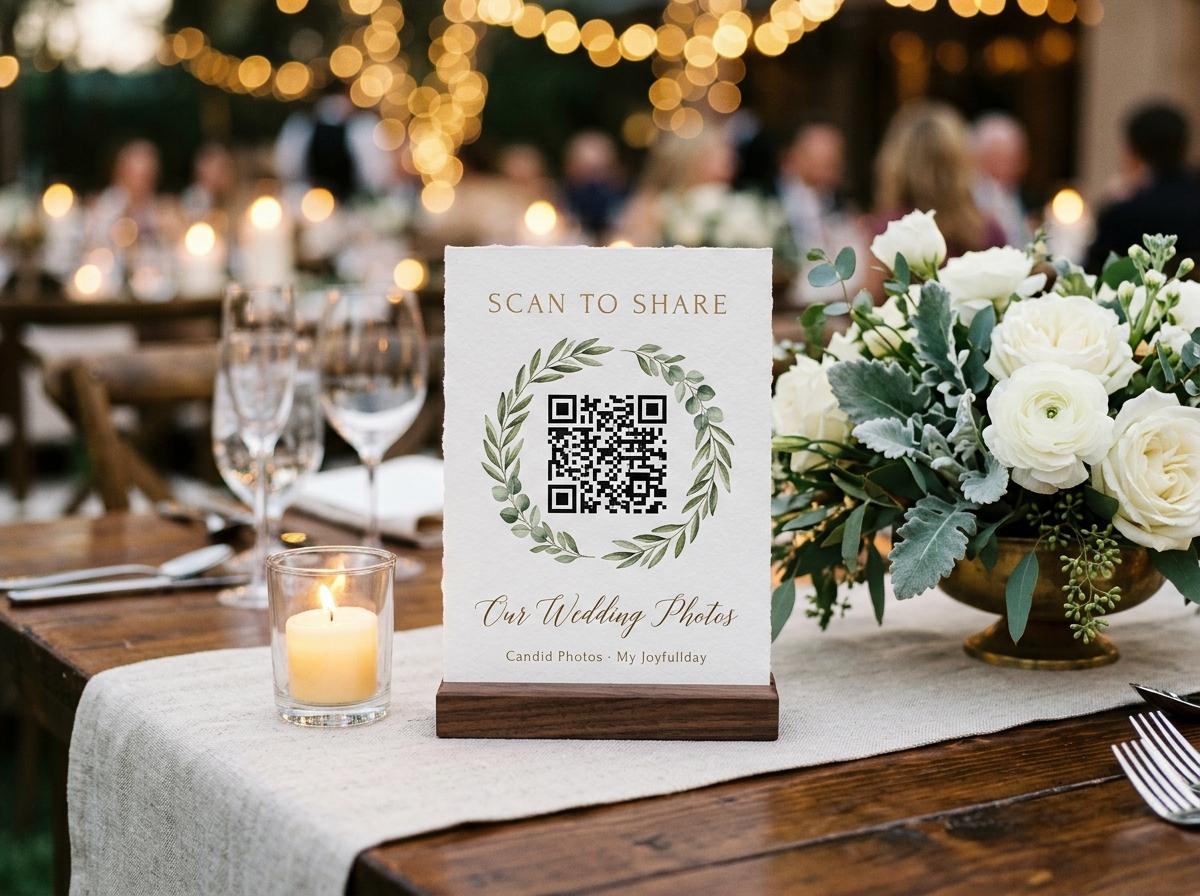
Each panel carries three things in this order of importance: a square big enough to read, a line telling the guest what happens when they do, and the plain address underneath it.
The dashboard prints four stands onto one A4 page, drawn straight from your collection, and each one encodes the same short address. They arrive flat, they fold into a small tent, and they stand among the glasses facing the person on the far side of the table. A wedding of fifteen tables is four sheets and a folding job. There is no card stock to order, no delivery that lands the day after your event, and no proof round with a print shop. If a sheet is ruined by a drink, you print the sheet again and the new one opens exactly the same page.
Printing the stands, in the order you do it
Open the collection first
The code is a picture of the collection's address, so there is nothing to print before the collection exists. Name the occasion, the hosts and the date, and check that the date on it is the real one, because the time a collection stays online is counted from that date.
Send the sheet to your own printer
Plain paper, an ordinary home or office machine, four panels to a page. Laser or inkjet does not matter; a glossy setting can put a sheen across the square that throws the light of a dim room, so matte or plain is the safer choice for a marquee or a candlelit hall.
Print one sheet and test it before printing the room
This is the step nobody skips at their convenience. Scan the proof from where a seated guest will be, on your own phone, at the distance of a table, and again with the overhead light off. One proof catches every problem you were about to have fifteen times.
Check the scale on the printed page
Measure the square rather than trusting the screen. If the printer has fitted the sheet to the page margins, every panel has shrunk slightly, and slightly is enough to make a code unreadable from a chair. Set it to print the page as it is rather than scaled to fit.
Print an extra sheet
One spare sheet covers a spilled drink, a borrowed card, a table that turned up with six extra people and a stand that gets packed away before the dancing starts. It costs four panels of paper and is the cheapest insurance in the whole plan.
Fold and place them facing the far side
A tent card works when the printed side looks at a person with a phone in their hand. Turn each one so it reads from the opposite chair rather than from the wall, and check the small print of the address is legible from where somebody will actually be sitting.
How big the square has to be
- Seated at a table
- Thirty to seventy centimetres is the working distance for a table stand, and that is the position the four-panel sheet exists for. This is the one placement where the standard layout needs no thought at all.
- Standing in a queue
- A card at the bar or the cake table is read at arm's length by somebody who is not settled, so keep the square at the top of the card and the words short. The guest will not lean in over a dessert display to work it out.
- Across a room
- A welcome sign by the door is read at one to two metres, which needs a square that the four-up sheet does not provide. Print a single stand enlarged onto its own page for that one, and cut it, because a code on the front door is decoration if nobody can reach it.
- The quiet space around it
- A square needs a margin of plain paper all the way around it to be read reliably. Nothing should crowd it: no border, no flower arrangement laid over the corner, no sticker, no handwritten arrow. If a code fails and the size looked right, the edge of a napkin is usually the reason.
- Contrast and ink
- Dark modules on a pale ground is what a camera reads best. A light-grey draft print, a half-empty cartridge, or a square printed over a photograph of the venue all make it harder, and none of them look like a problem to a human eye standing in a bright kitchen.
What a code that is too small or too far away costs you
It costs the quiet tables
A readable card is scanned by the enthusiastic table either way. An unreadable one removes the contributions of the four tables furthest from the light, the elderly relatives who did not lean in, and the people who were going to send the two photographs you most wanted.
It looks like a broken page
A guest who points a camera at a square that does nothing assumes your link is faulty, not their angle. They put the phone away and never try again, and there is no message telling them the file was too small to read.
It transfers the work to you
Every guest who cannot scan becomes a person you have to chase the next week, which is the slow, low-yield version of the same job. The printed stand is what makes the asking happen without you in the room.
It is invisible in hindsight
This is the nastiest part. Nothing reports a failed scan, so a collection of forty photographs looks like an enthusiastic room rather than a room of a hundred and forty where two thirds of the cards could not be read. Walk the table line yourself before the doors open.
Where the stands go once they are cut
- One on every table, folded to face the person sitting opposite, because that is the guest who would never otherwise see it.
- One at wherever people stand rather than sit: the bar, the cake, the dessert table, the cloakroom, the photo wall.
- One at the drinks reception, which is where the photographs before the ceremony actually get taken.
- One at the far end of a long table, since a single card in the middle reaches three people and the two at the end hear nothing.
- One on the order of the day or the programme, which is the only paper that leaves the building in a pocket.
- One kept back at the top table, so a stand that disappears can be replaced before anybody notices it went.
Squares on a wall at head height work only if a guest can stand close enough to read them. One at the cloakroom, at the height of a hand rather than a noticeboard, will collect more photographs than three printed at the top of a staircase.
A printed code is only as good as the distance between it and the person who was never going to move their chair.
Paper against a projected square
The printed stand
- In front of twelve seated people for two hours without needing power, light or a person to point at it.
- Read at the guest's own pace, with nobody waiting behind them.
- Survives a speech nobody heard, and can be moved when the crowd drifts.
- Goes home in a pocket on the programme, which is how the morning uploads happen.
- Costs paper and twenty minutes of folding.
A square on the room screen
- Enormous, and therefore readable from the back of a hall nobody could reach on foot.
- Works brilliantly for one minute when the room is looking at it, and poorly after that.
- Competes with the slideshow that the same screen is meant to be playing.
- Depends on the projector, the laptop and the person who was asked to run them.
- Reaches a standing room that has no table and therefore no card.
Use the screen once, during the announcement, and let the paper do the rest of the evening. A projected square is a good way to make an introduction; a card on the table is the way to collect the files.
The plain address, printed beside every square
Some guests do not point their camera at things, and some will be sitting where the glare lands, and one table will have a phone with a cracked lens that cannot find focus. For all of them the typed address is the same journey done slowly, so print it on the panel while you are there, in the same small type as the rest of the card. It is also the line you copy into a message the following morning, and the one thing a guest who left before the cake can still reach from a hotel. The two routes land in the same collection, so there is no reason to make anybody choose between them.
Reprinting changes nothing about where the photographs land
Because the square simply encodes the collection's live address, a sheet printed on the Thursday and a sheet printed on the Sunday open the same page. The one thing to avoid is printing from a saved screenshot of a previous event, which opens that event's page instead and looks exactly as healthy as a fresh code.
Ask the help deskPrinting questions, answered plainly
Do I need a special printer or card stock for the stands?
No. The sheet is built to come off an ordinary home or office printer on plain paper, and four stands fold into table tents from it. Ordering proper cards is an option for the look of the table, never a requirement for the code to work.
How many sheets do I print for a room of fifteen tables?
Four sheets covers a table each, with a spare or two for the bar, the cake and the cloakroom, plus one sheet kept back for the ones that go missing. Printing an extra sheet costs nothing except paper and is far cheaper than a table that spent the evening with no way to send anything.
Can I add the code to my own invitation design?
Yes, as long as the square keeps its margin, stays dark on pale, and is sized for the distance it will be read at. The plain address beside it belongs on the same page, and the wording should say what the guest gets out of scanning.
Why will my phone not read the code I printed?
Check three things in this order: whether the printed square is smaller than it looked on screen, whether something is crowding its edge, and whether the ink is light enough to lose contrast in a dim room. If all three are right, use the address printed underneath.
Does the printed code expire?
The square does not; only the collection does. A stand printed weeks early opens the same page on the day as it did in the kitchen, and the address stops working when the collection reaches the closing date its plan states.
What happens if somebody at a table photographs the card and sends it on?
The address is unlisted rather than published, but anyone who holds it can open the page, so decide before the doors whether guests may browse the gallery or only add to it. Turning the viewing off leaves the card working as an uploader for whoever finds it.
The last check before the room fills
Walk the tables once with your own phone before the first guest sits down. Start at the darkest corner, fold each card to face the far chair, and scan from where a seated person will actually be, without standing up. Two minutes of this catches a sheet that printed small, a card facing the wall, a table with nothing on it and a glare you could not see in the kitchen. Then leave one stand at the top table and go and greet somebody, because the paper is the part you control and the rest of the evening belongs to the room.
Print the sheet, test one panel, then print the room
Open a collection, put four stands on one A4 sheet, and run the proof scan at the distance your guests will be sitting. The codes for a whole venue take twenty minutes, an ordinary printer and a pair of scissors.
QR code photo sharing
Put one link on the tables and let everyone contribute.
Create a collection, print the table stands, and the photographs your guests took are waiting for you the morning after. Guests never install anything and never make an account.