The guest side of a collection
A Guest Photo Upload Link Worth Printing
A guest photo upload link is one short web address that opens straight to a picker on somebody else's phone. It is the entire guest side of a shared collection, so it deserves to be thought about on its own.
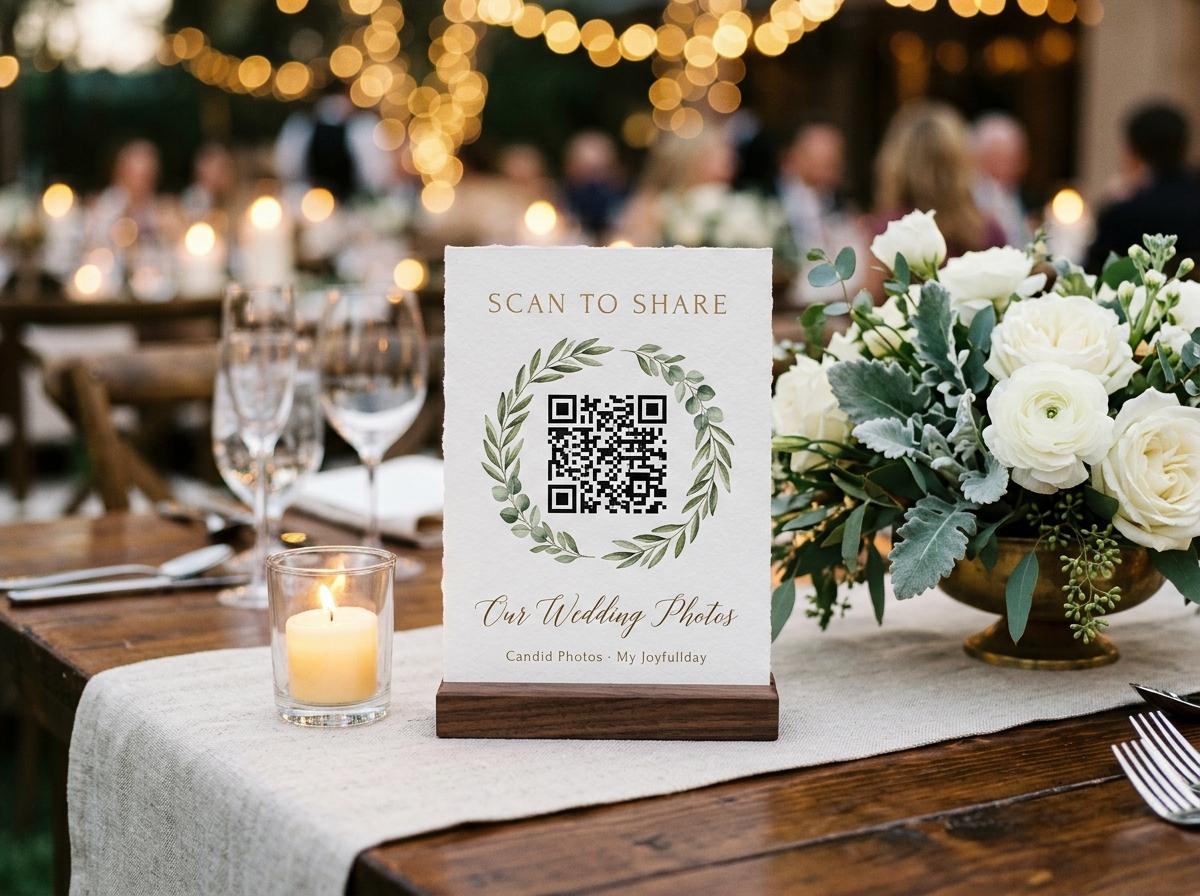
Most hosts think of this as a detail inside a bigger setup. It is closer to the opposite. Everything else about a shared collection happens later, in a gallery only you are looking at. The link is the only moment your guests are involved, and a guest who cannot get it open, or does not understand what it opens, is the single most common reason a collection stays half full.
What the address actually opens
- A browser page, not a store
- The link opens in the browser your guest already uses, on any phone, without downloading anything. There is no app to install at any plan, and no account, because a person mid-dessert is not going to fill in a registration form for somebody else's event.
- A picker and one name field
- The page asks whose camera these came from and then opens the photo chooser. Photographs and video clips can travel in the same submission, which is what keeps the speech clip out of a separate conversation three days later.
- A memory of who was typing
- Once a guest gives a first name, the page remembers it for twelve hours and does not ask again. Somebody sending a second batch after the speeches types nothing but the send button.
- Whichever gallery you chose
- Behind the sending controls there is either a gallery filling up in public view of the person who is typing, or no gallery at all, with the page doing nothing but receiving. That is your decision to make, and it is one switch.
The address itself is short by design. Short is not a cosmetic choice here: a guest at a crowded table reading an address off a screen, typing it into their own phone with one hand, is the failure mode you are designing out. Where typing is unavoidable, a short address is the difference between somebody arriving and somebody giving up and going back to the conversation.
Two forms of the same invitation
The short address, typed
- Travels through text, email and an invitation with no printing
- Works for the guest who is not in the room at all
- Needs somebody to spell it correctly while standing up
- Best read aloud once, slowly, and written on a board or slide
The QR code, printed
- One camera point and the page opens, with nothing typed
- Belongs physically near the moment: tables, bar, cake table, welcome board
- Useless to a delegate who is at home and would happily have sent
- Four table stands print on one A4 sheet from an ordinary printer
Run both. They are the same address wearing two faces, and events are made of guests who are seated and guests who never arrived.
Where to put it so that people use it
Placement is a question about phone habit, not about decoration. A code works where a guest is already holding a phone with a photograph in it.
- The tables people sit at for an hour, which is where photographs get reviewed and deleted
- The welcome board or order of service, read by people who have just arrived and are still holding their phones up
- The bar or drinks area, where standing guests have a free hand and a full camera roll
- The photo wall or formal queue, where the person next in line is bored and shooting
- The screen that is already running, as a slide between sessions or songs
- The invitation and the joiners' email, days before, which reaches the guests who will leave early
- A position that only staff will see, which is decoration. Guest photographs come from guest chairs.
Handing it out before the day
Open the collection first
A collection can exist while the event is still being planned. That is what lets a real address go onto a printed invitation instead of being improvised at the microphone.
Put the address in the joining message
One line, framed as an invitation rather than a chore: pictures from your phone are welcome and this page takes them whenever you want. People who are travelling send on the morning; people who forget get a second chance on the night.
Print the stands while you still have time
Print the A4 sheet, cut it, and put the stands in the same bag as everything else you are carrying. Test one by scanning it from the far end of the room on a phone that is not yours.
Mention it once, then stop
One clear mention while people are seated is enough. Repeating an appeal through an evening reads as a request for favors, and guests start to avoid eye contact with the host who is chasing them.
What a guest is asked for, and nothing else
A first name
So you know whose camera the frame came from. Nothing else about them is collected, and no password exists anywhere in the process.
The pictures they already took
The picker opens on their own camera roll. Nobody is asked to photograph on your behalf or to take a better shot; the page only wants what is already sitting there.
Nothing about money
Guests never pay, and the page they open shows no price at any plan. The whole commercial side of this is a single one-off decision you made when you opened the collection.
No explanation of how it works
This is the practical argument for the code over the account. A link that needs a walkthrough before a guest can use it will be used by the confident few and skipped by everybody else.

If the address travels further than you meant
A link that is easy to use is also easy to pass on, which is the one real risk in this design. The page is not advertised anywhere and stays out of search indexes, so nobody finds your event by typing a few words into a search engine. But a guest who forwards it to a wider group has handed your collection to people who were not invited, and the only protection there is the one the sender chooses.
Two switches that limit the damage
Turning browsing off leaves the guest page as an upload-only form, so a forwarded address can send but cannot read. Turning the accept-each-one-first switch on holds every submission until you say yes, which is the option to choose before the day rather than during it, since it is off by default.
Ways to keep a collection privateTesting the link before you print anything
The three ways a guest actually reaches the page
- A camera pointed at a code
- The dominant route, and the fastest. No typing, no reading aloud, no battery of small decisions. It works standing up, in low light, mid-conversation, which is the real condition of an evening.
- A tap inside a message
- The route for the guest who is not in the room, and the one that keeps working after the event. Somebody who left early, or who is on a train with the photographs still open, sends from the address in their own inbox rather than a photograph of a printed stand.
- A typed address, read off a wall
- The fallback, and the one that needs the shortest address you can get away with. Two people typing the same address from the same sign, one getting it right and one giving up, tells you more about your link than any feature list does.
When a guest cannot get it open
Somebody hands them the phone and does it together
This solves almost everything, and it takes fifteen seconds. A guest who is uncertain about a link is rarely unwilling; they are unwilling to be wrong in front of the table.
The code is too small, or too far
A stand on the far side of a twelve-seater table is not reachable by a camera at the end of a bench. One stand per four guests, placed where people sit rather than where the room is decorated.
The venue's network will not carry it
A sending page needs a connection at the moment of sending. Where signal is thin, keep the address printed and let people send from the car park, the hotel lobby or their own kitchen the next morning.
The guest does not trust what the page will do
Say one sentence about it: the pictures go to the host, they are not posted anywhere public, and the page does not want a password. That single explanation converts more submissions than any redesign of the code.
Testing the link before you print it
A guest photo upload link gets exactly one chance to work: the moment a person who has no interest in your project points a camera at a piece of paper and expects a page to appear. Everything in the list below is testable in five minutes the evening before, and every line of it describes a failure that has quietly left a collection half full.
- Scan the printed code from the back of the room, in the lighting you will actually have
- Open the page on a phone you do not own and confirm it loads on the venue's network
- Send one test photograph and check the name you typed shows on it
- Confirm the second submission does not ask for a name again
- Read the short address aloud to another person and see whether they type it correctly
- Check the plan you chose is tall enough for the number of guests you expect to send
A collection has a ceiling on photographs, video clips and storage, and the free plan caps how many guests can contribute at all. Nothing about a link warns you when a limit arrives, so this is worth knowing in advance rather than discovering at 20:30.
What the address is not
- It is not an account. No guest of yours creates a login, resets a password or accepts terms on your behalf.
- It is not a store listing. There is nothing to search for, nothing to install and nothing to update before the page opens.
- It is not a public gallery. The address is not listed anywhere, the page stays out of search indexes, and browsing can be turned off entirely.
- It is not a price. Nobody who opens it sees what you paid, and nobody is ever asked to pay to send.
- It is not a two-week errand. The page is built for the ninety seconds a guest is already sitting with a phone in their hand.
Questions about a guest photo upload link
Does every collection get its own link?
Yes, with a matching QR code. One collection is one event, so the address that goes on your tables and the one in your invitation belong to the same place.
What happens if a guest is not comfortable with QR codes?
They type the short address, or a person next to them opens it and passes the phone back. This is also why the code is printed beside readable text rather than instead of it.
Can a guest send from a photograph they took weeks ago?
The picker opens on their whole camera roll, so a picture from the rehearsal or the journey there can go in the same submission as one from the evening.
Do I have to be online to receive them?
Your guests do the sending, and their photographs are stored as they arrived. You can watch the grid fill from a phone or a laptop whenever you next look at it.
What if a guest sends something twice?
Nothing automatic decides it for you. Where duplicates bother you, the accept-first switch lets you turn a repeat away, and rejected submissions stay out of the archive you download at the end.
One address, and then one archive
The point of a careful link is not the link. It is what you can do afterwards: one streamed archive holding the room's version of the day, every frame still credited to its sender in the collection it came from, copied out for a parent or a colleague without anybody re-sending anything. A guest upload page is the cheapest way to get from forty private camera rolls to one thing you actually own, and the only part of that transaction your guests will remember is how little it asked of them.
Every shared collection is one address, a room full of contributors, and one download at the end. The address is the only part your guests will ever touch, so it is the part worth getting right.
Get the address out before the day
Open a collection, print the sheet, and put a working link in front of people who still have the photographs on their phones.
Photo collection by event type
Put one link on the tables and let everyone contribute.
Create a collection, print the table stands, and the photographs your guests took are waiting for you the morning after. Guests never install anything and never make an account.