QR code photo sharing
Wedding QR code photo sharing: how the code becomes a collection
A QR code on a table card is the most effective way to get photographs from wedding guests. Here is why the channel works, and what has to be true for it to work at a real wedding.
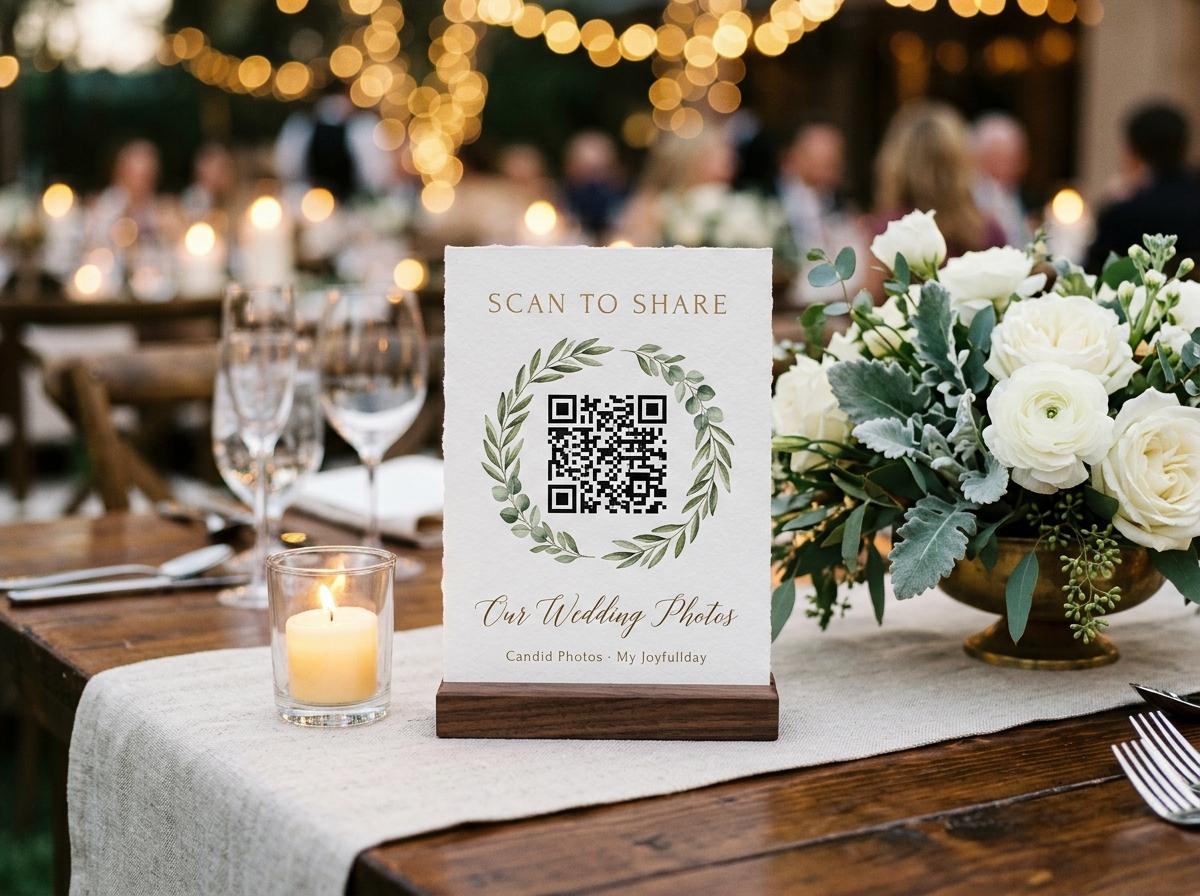
A QR code is not a technology feature. At a wedding, it is a physical object: a printed square on a card, sitting on a table in front of twelve people for two hours. The reason QR codes work for wedding photo sharing is not that they are clever. It is that they are present. A guest does not have to remember a web address, copy it from a projected screen, or ask anyone what the link is. They point a camera at the card in front of them and the page opens.
The code itself is one part of the system. Where the code goes, what the page behind it does, and what the event owner set up in advance are the parts that determine whether the collection fills or stays empty. This page covers all of them.
Why physical placement matters more than the code itself
Wedding photo sharing experiments that place the QR code only at the entrance typically collect a fraction of the photographs that table-based placements collect. The logic is simple: a guest at the entrance is in motion, arriving, looking for someone. A guest at a table is seated, comfortable, holding a phone, and has nothing pressing to do between the main course and the dessert. The two-hour dinner window is when photographs get uploaded, and the QR code has to be in that window, at every table, to reach everyone in the room.
Where to place the printed stands
One on every table
This is the minimum. Not one per guest, and not one per room: one per table, so that every seated guest is within reach of the code for the full duration of the meal. Tables with no stand simply do not contribute.
One at the bar
The guests who spend the evening standing up — the ones who were always going to be on the dance floor — are at the bar between songs. A stand at the bar catches them during one of their seated moments.
One by the cloakroom or the exit
Late contributions happen when a guest is leaving and remembers they had photographs to send. The last visible code they encounter on the way out is what prompts the final-hour uploads, which are often from the dance floor and the speeches.
One at the welcome drinks
If the event has a reception period before dinner, a stand at the welcome drinks catches the ceremony photographs — the ones taken during the quiet moments outside the building — before they are buried under the rest of the day.
Printing the QR code cards without a designer
The collection dashboard generates table stands that print on an A4 sheet from a home printer. Four stands per sheet, six sheets for twenty-four tables, and the print file appears without leaving the dashboard. Each stand contains the QR code, the web address in text for guests whose camera cannot focus on the small print, and the welcome line from the collection settings.
From dashboard to table
Open the event and navigate to the print section
The print option is in the dashboard for every paid plan. Free events get a printable code but not the full stand layout.
Choose how many stands you need
The dashboard calculates sheets from the number of tables you enter, with enough extra to cover the bar and the other placement points.
Print on card or standard paper
Card stock holds its shape better on a table but is not required. Standard printer paper folded in thirds makes a reasonable stand. Pre-cut stands available from print suppliers take the folding out of the process entirely.
Put them on the tables the morning of the event
Venue staff can place them when setting the tables if you bring them in advance. The stands are small enough to travel flat in a folder.
What happens after the scan
The QR code links directly to the collection's guest page. That page is what the event owner configured: a welcome line, a file picker, a name field, and a send button. No intermediate marketing page, no signup prompt, no requirement to do anything before seeing the upload form.
- The browser that opens
- The phone's native camera app reads the code and passes the address to the browser the guest already uses. No scanner app is required, and no choice between browsers is presented.
- The file picker
- Opens on the camera roll from today. Photographs and video clips appear in the same picker. A guest can select one file or twenty in a single submission.
- The name field
- One field, the only information asked of a guest. The page stores the name for twelve hours, so a guest who comes back for a second upload is not asked twice.
- The confirmation
- A receipt appears when the upload completes. It says the submission arrived and says nothing else. No email to verify, no second step, no reason to stay on the page.
Wedding QR code photo sharing for guests who do not scan codes
Some guests at every wedding are sceptical of QR codes. Some older guests are not confident with the scan gesture. Some guests have a camera that will not focus on the small pattern. None of these guests are lost.
The text address
Every stand prints the web address in text below the code, so a guest who cannot or will not scan can type it. The address is designed to be short enough to type from a phone keyboard.
The person at the next seat
One guest at every table scans. When their own photograph appears on the room screen, the person next to them asks how they did it, and the page spreads table by table. Social proof is more effective than any instruction the couple can give.
The room screen
The slideshow playing the collection on a venue screen is visible to the whole room. A guest who sees their own photograph on that screen, or sees a friend's, connects the QR code to a result they can see. The screen and the code work together in a way neither does alone.
Questions about wedding QR code photo sharing
Does the QR code change if we update the collection settings?
No. The code links to the collection's permanent address. Settings like approval, gallery visibility and the welcome line can all be changed from the dashboard without changing the code or the address.
Can we use our own QR code design?
The dashboard generates a standard code that works with all phone cameras. If you want to incorporate it into custom stationery, the code image can be downloaded and placed in a design tool.
Does the code work on older phones?
Any phone from the last eight years or so reads QR codes from the native camera app without any additional software. Older devices that pre-date native camera scanning need a scanner app, but those devices are rare enough at weddings not to plan around.
What if a guest opens the page and closes it before uploading?
The address stays in their browser history and in any message you have sent them. They can open it again from home the same evening or the next morning, and the submission lands in the same collection.
Is there a limit on how many times the code can be scanned?
No. The code links to a web page, and a web page can be opened any number of times by any number of guests. Each scan is a separate session and costs nothing additional.
Put the code on the table before the dinner starts
Your collection generates a QR code and a printable stand layout the moment you create the event. Print the stands, put them on the tables, and collect what the room photographs.
Wedding photo sharing
Put one link on the tables and let everyone contribute.
Create a collection, print the table stands, and the photographs your guests took are waiting for you the morning after. Guests never install anything and never make an account.