Guest uploads
Wedding guest photo upload without the friction
Getting guests to upload their wedding photographs is not a motivation problem. It is a design problem. Every step you remove doubles the number of people who finish.
Guest photographs from the ceremony, the speeches and the dance floor.
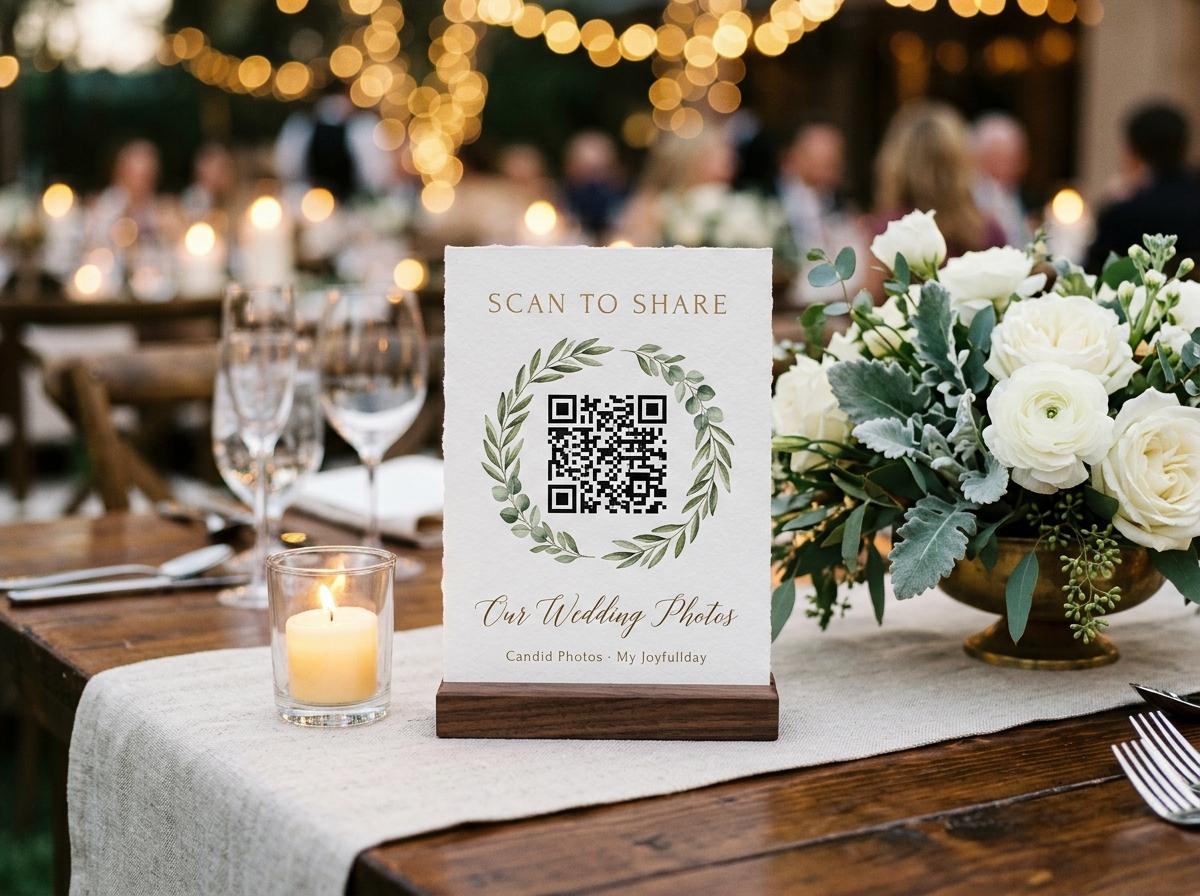
Wedding guest photo upload is a phrase that sounds like a technical task but is really a social one. The question is not how to build a file transfer mechanism. It is how to make the act of contributing a photograph cost a guest less than the act of staying in their seat and doing nothing. That is the real design problem, and it has a specific solution: remove every step that is not strictly necessary, make the remaining steps happen in the guest's own browser, and put the whole thing on a card in front of them while they are seated.
This page walks through what the upload experience looks like from the guest's side, what the event owner sets up in advance, and where most photo-collection attempts fail and why.
Where the upload breaks down — and what to do instead
What causes drop-off
- Asking guests to install an app before they can contribute anything.
- Requiring an account with an email verification step.
- Linking to a shared folder that needs a login the guest may not have.
- Putting the link only in the speech, with no printed reminder anywhere.
- Sending a follow-up request two weeks after the wedding when photographs are buried.
What keeps contributions coming
- A browser page that opens from a code scan with no installation.
- A single name field — the only information a guest provides.
- A printed card on every table so the ask is visible for two hours.
- Photographs and video in the same picker, opening on today's camera roll.
- A collection address that stays open so guests can upload the next morning.
The difference in collection size between these two approaches is not marginal. It is the difference between twenty photographs and several hundred.
The upload flow, step by step from the guest's perspective
What a guest actually does
They see the card on the table
A printed stand, sitting at their place or in the centre of the table, carries the QR code and the web address. They see it during the meal and during the speeches. They do not have to look for it.
They scan the code
The phone's native camera app reads the code. No third-party scanner, no separate step, no choice between multiple browser apps. The page opens in whatever browser is already set as default.
They see the event details
Your names, the date, and the welcome line you wrote when you set up the collection. This takes two seconds to read and answers the two questions a guest asks themselves: is this real, and is this worth finishing?
They choose files
One tap opens the file picker, which opens on the camera roll from today. Photographs and video clips appear together. The guest can send one file or ten in a single submission.
They type a name and press send
One field for a name, then the send button. The receipt appears immediately. The page stores who is typing for twelve hours, so a guest who comes back for a second upload is not asked their name again.
An upload that takes thirty seconds during dinner will happen. One that requires three decisions will not.
What the event owner sets up and when
Setting up a wedding guest photo upload collection takes ten to fifteen minutes and can happen months before the event. Everything except the printed cards is handled from the dashboard.
Three moments in the setup
When the invitations go out
Open the collection and copy the address
The collection address and QR code are generated the moment you create the event. Put the address in the digital invitation and in the message group, so guests who want to find it later have it written down somewhere. The QR code at this point is for the stationery; you can also print the table cards much later.
Ten days before
Print the table cards and choose the settings
Four stands print on one A4 sheet from the dashboard. Each stand carries the QR code, the text address, and the welcome line. At the same time, decide whether you want to approve each submission before it appears in the gallery. Turning approval on is the right choice for a room containing guests you have not met.
On the day
Put the stands on the tables and announce the collection once
One stand per table, one at the bar, one at the entrance. During the welcome or just before the main course, say thirty seconds about the code on the table and what it is for. Then stop. The cards do the rest of the work for the next two hours.
File quality, privacy and what happens after the upload
Three things matter to couples who are thinking carefully about guest photo uploads: whether the files arrive at full quality, who can see them, and what happens to them after the event.
- File quality
- The file a guest selects from their camera roll is the file that arrives in the collection. Nothing is compressed in transit. A thumbnail is generated locally in the guest's browser for the gallery grid, which is why the gallery loads quickly even on a weak venue connection, while the full file is stored intact.
- Privacy
- The collection address is not listed anywhere and guest pages are excluded from search indexes. Only people you have shared the address with can open the page. The couple controls whether guests can browse each other's uploads or whether the page is upload-only.
- What happens after
- At the end of the plan period, the event owner downloads the collection as an archive. The archive contains the original files in the order they arrived, with contributor names attached. After the period ends, the files are removed from the platform, which is why downloading before the closure is the step that matters most.
Download the archive before the collection closes
Warning mail arrives before any collection comes down, but the most common regret among event owners is not downloading early enough. The archive is the copy that lasts.
What to do after the weddingReaching guests who did not upload on the night
Late uploads are often the best photographs, chosen rather than grabbed. A guest who opens the collection the next morning has had time to look at what they took and pick the frames that mean something. The collection stays open for the duration of the plan, and the address they already have still works.
How to get the tail to arrive
- Put the collection address as text in the message you send to all guests the morning after.
- Name what you are still missing: nothing from the ceremony, nothing from the toasts. A specific ask produces specific files.
- Give a date. Guests respond to a closing date in a way they do not respond to open-ended requests.
- Accept that some guests will not upload. Pressing the point damages the relationship more than it fills the gap.
The message works better as 'here is the link again if you have anything from yesterday' than as a formal request. The tone of the original ask carries over.
Questions about wedding guest photo uploads
Do guests have to register or create an account?
No, on any plan. A guest opens the page from the QR code or the link, selects their photographs, types a name, and sends. No email address, no password, no account of any kind.
Can guests upload video as well as photos?
Yes. Photographs and video clips go into the same submission from the same picker on every paid plan. The free Preview plan accepts photographs only.
What is the maximum number of photos a single guest can send?
There is no per-guest limit. Guests can send as many files as they like, subject to the overall capacity of the plan. The practical ceiling is whatever the guest's camera roll contains.
What if the venue wifi is poor?
Uploads over mobile data work the same way as over wifi. If a guest cannot upload on the night because of connectivity, the collection address stays open and they can upload from home the next day.
Can we see which guest sent which photo?
Yes. Every submission carries the name the guest typed, and the dashboard shows contributor names alongside their uploads. This is what makes it possible to follow up with a specific guest about a specific photograph.
Set up the collection before you print the stationery
Your collection address and QR code are ready the moment you create the event. Put them on the table cards, say one sentence at dinner, and collect what the room took.
Wedding photo sharing
Put one link on the tables and let everyone contribute.
Create a collection, print the table stands, and the photographs your guests took are waiting for you the morning after. Guests never install anything and never make an account.