Guestbook signs
Wedding Guestbook QR Code Sign Wording Guide
Write clear, friendly instructions for the QR code sign at your wedding guestbook station. The right wording gets guests to scan. The wrong wording gets guests to walk past.
Wishes, notes and congratulations that survive the evening.
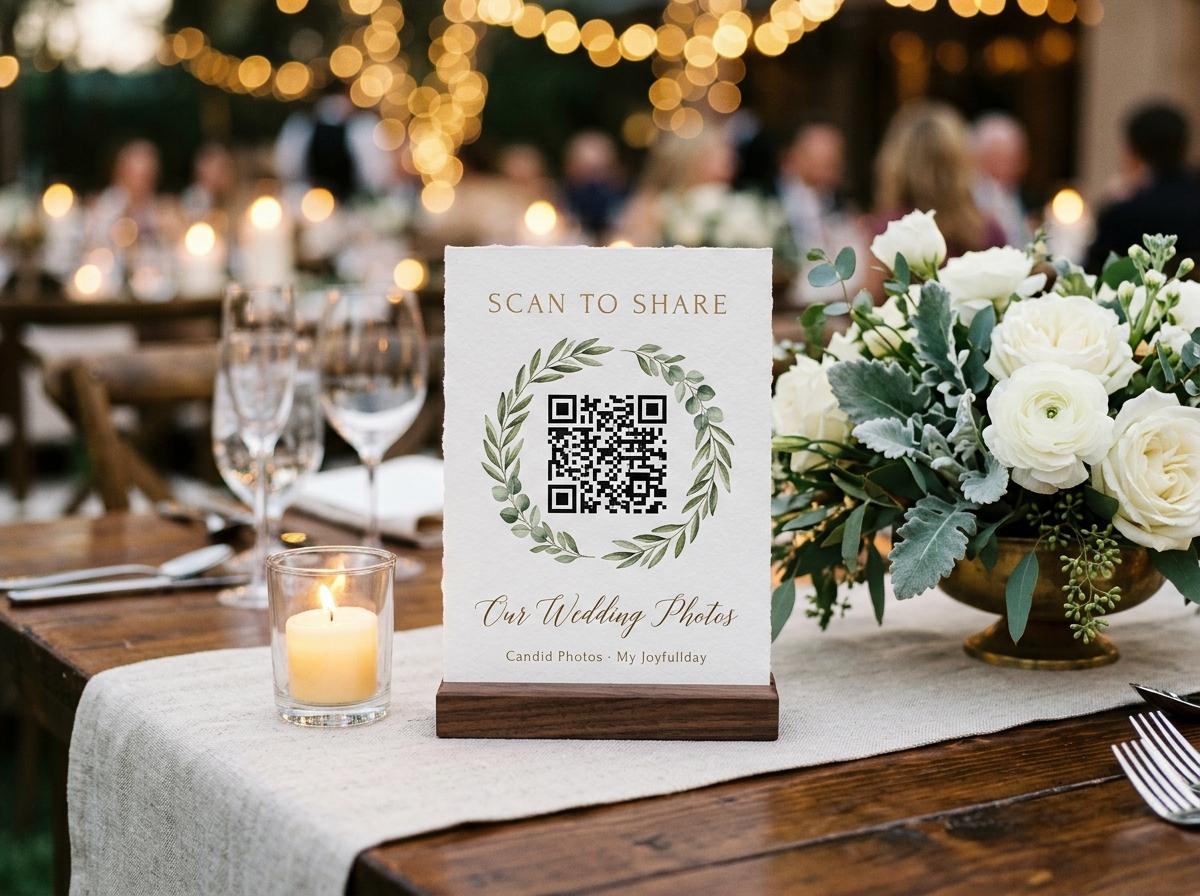
A QR code sign at a wedding guestbook station has one job: get a guest to point their phone at a small square of black and white pixels and understand, in three seconds, what will happen next. That is a harder job than it sounds. The sign is competing with a table full of people, a room full of noise and a guest who is halfway through their starter and not looking for a task. The wording is what does the work.
Most QR code signs at weddings fail because they describe what the technology is rather than what the guest is being invited to do. 'Scan to contribute to our digital guestbook' tells a guest what category of experience this is. 'Scan to leave us a message and your best photo' tells a guest what their two minutes of effort will produce. The second version is more likely to get a scan.
The structure of a good QR code sign
Every effective sign has a headline, one line of instruction and the code. Everything else is optional.
The parts of the sign, in order of importance
- The headline
- One line, in large text, that tells the guest what this is for. It should include the couple's names or the occasion. 'Leave a message for Emma and James' works. 'Digital guestbook' on its own does not, because a guest is not looking for a category — they are deciding whether to do a thing.
- The instruction
- One sentence that tells the guest exactly what to do and what will happen. 'Scan the code below with your phone camera, leave us a message and send your best photos from today.' That is the whole instruction, and it covers the full scope of what the guest can contribute.
- The QR code
- The code itself, printed large enough to scan from the other side of a table. If you are printing A5, the code should be at least five centimetres square. Test the printed code from a reasonable scanning distance before the event.
- The URL in text
- Below the code, in smaller text, the full web address. Some guests will not scan a code they do not recognise; some guests at some tables will not be able to get their camera to focus on it. The text address is the fallback for both groups.
- A note on what guests do not need
- Optional but useful: one short line that tells guests they do not need an app. 'No app needed — just your camera.' This removes a common obstacle. Many people assume a QR code requires installing something, and the assumption is enough to stop them trying.
Example wording for different tones
The tone of the wording should match the tone of the wedding. A formal wedding with printed menus and a string quartet calls for different language than a relaxed celebration with a backyard barbecue. Here are examples for several different registers.
Sign wording examples by tone
Simple and direct
'Leave us a message. Scan with your phone camera or visit [address]. No app needed.' This works for any wedding. It is short enough to read in two seconds and clear enough to act on without questions.
Warm and personal
'We would love to hear from you. Scan below to leave Emma and James a message, share your photos from today, or both. No app or account needed — just your camera.' This version addresses the guest directly and mentions both the message and the photographs.
Informal and relaxed
'Got photos? Got something to say? Scan this and share them. No app needed.' This works for a casual celebration and takes three seconds to read. It implies the guest already knows what a guestbook is and does not need explaining.
With a specific ask
'We asked our photographer to get the moments they could see. We need you for the ones they missed. Scan to send your photos and leave us a message.' This version gives the guest a reason to contribute that is not just 'this is a feature'. It works well for couples who care about the candid photographs.
For a multilingual wedding
If your guest list includes speakers of more than one language, consider two or three lines of instruction in different languages, with the code in the centre. Keep each language version to one sentence so the sign does not become too long to read. Test the layout before printing.
What not to put on the sign
Some choices make a QR code sign harder to use, not easier. These are the ones that come up most often.
Things to leave off
- The name of the platform or app. Guests do not need to know what software powers the guestbook. 'Scan to contribute to our Candid Photos digital guestbook' adds two words of friction for no benefit.
- Long instructions. If the guest needs more than four seconds to read the sign and understand what to do, the sign is too long. Everything that is not essential to the action — scan, type, send — belongs somewhere else.
- A QR code that is too small to scan. Test the printed size from a realistic distance before the event. A code that is sharp on a screen may not scan reliably from a printed card at the size you chose.
- Technical language. 'Upload your media to our event gallery platform' is accurate and useless. 'Send your photos' is imprecise by comparison and will get five times as many scans.
- A promise about privacy that you cannot keep. If you say the photographs will be kept private, make sure the collection settings enforce that. Do not add a privacy statement to the sign as a reassurance if you have not thought through what it means in practice.
A good sign tells a guest what to do, not what the technology is. Those are different sentences.
Physical placement: where the sign works and where it does not
The best wording in the world does not help if the sign is in the wrong place. Where a QR code card sits determines how many guests see it, how many look at it long enough to read it, and how many decide to scan it.
On the dinner tables, one per table
This is the most effective placement for a wedding reception. Guests are seated, they have finished their starter and they are looking at the table. A card-sized sign at the table is something they will pick up and look at. A single sign at the entrance is something they will walk past while navigating the room.
By the bar or drinks station
A second sign near where guests queue for drinks catches a different moment: standing, waiting, holding a glass, looking for something to look at. This is a secondary placement rather than a replacement for table cards.
By the entrance on the way in
An entrance sign is better for a photo booth or a direction marker than for a guestbook, because guests arriving are focused on finding their table, not on a task. If you use an entrance sign, also put cards on the tables.
At eye level, not on the floor
A sign that requires a guest to crouch or bend to read the QR code will not be scanned by most guests. Table cards work because they are at the natural focal height of a seated person. A floor-level sign with a code is a decorative object, not an instruction.
Questions about guestbook sign wording
How much text should the sign have?
As little as possible while still being complete. A headline, one line of instruction, the QR code and the URL in text is enough. Everything beyond that reduces the chance that a guest reads all of it before looking away.
Should the sign mention that guests do not need an app?
Yes, if the space allows. Many guests assume that scanning a QR code means downloading something. One short line — 'no app needed, just your phone camera' — removes that assumption before it becomes an obstacle.
What font size should the QR code card use?
The headline should be readable at arm's length. The instruction text can be slightly smaller, but not so small that a guest over fifty has to squint. If you are printing on A5 or A6 cards, test a printed copy before ordering a large run.
Should the sign include both a QR code and a text URL?
Yes. Some guests will not scan an unfamiliar code. Some guests will find their camera will not focus at the angle of the sign. The text URL is the fallback for both groups and adds very little to the sign's visual footprint.
Can the same sign be used for both photos and messages?
Yes, if the collection has both features enabled. Write the instruction to cover both: 'scan to send your photos and leave us a message'. Do not write an instruction that only describes one when both are available.
Set up the guestbook and print the signs
Create a wedding collection with the guestbook enabled, download the QR code, and print table cards with wording that tells your guests exactly what to do.
Guestbooks and written messages
Put one link on the tables and let everyone contribute.
Create a collection, print the table stands, and the photographs your guests took are waiting for you the morning after. Guests never install anything and never make an account.