Event photo sharing
Event photo sharing that guests actually finish
Everyone at your event took photographs. Getting them into one place is the part that usually fails. This is the version that works: one link, one page, no app, and every picture that arrives attached to the name of the person who took it.
A photographer is hired for the moments someone is supposed to remember: the arrival, the vows or the speech, the cake, the formal group. Everything else — the unscripted toast at table six, the chaos of the dance floor, the face your friend made when the music started — is on the phones of the people who were standing there. On a good day that is forty or fifty cameras pointing at the same event from fifty different angles.
Event photo sharing is the act of getting all of those pictures into one place that the host owns, without turning the evening into a homework assignment for your guests. It sounds like a small technical problem. In practice it is a manners problem: whoever asks for photographs after the event ends is asking a room full of tired people to go through their cameras, pick the good ones, and send them somewhere.
The four ways people usually try
Most hosts reach for one of four approaches, and each one has a predictable failure point. Knowing them is useful, because the fix for event photo sharing is mostly about avoiding them.
A group chat
Fast to start and impossible to finish. Photos arrive one at a time between messages, get compressed twice by the app before they land, and there is no way to see what you already have or who still owes you something. Six months later the chat has scrolled out of the phone the pictures were in.
One shared cloud album
Better, but it asks every guest to sign into someone else's cloud account, or to accept an invitation from a service they have never heard of. Older relatives and anyone who arrived late will not get in, and you will spend the morning after answering questions about it.
A request to text or email the photos
Works for the three people who were always going to do it anyway. It is the reason the photo you wanted most never arrives: you are asking a guest to find the file, choose a recipient, and attach it, which is four decisions where one would have been enough.
A hashtag and a social post
Public by default, which is the opposite of what most family events want, and it depends on a platform remembering your event long after the trend has moved on.
What a working version looks like
One address for the whole event, reachable from the table without typing anything, that opens straight to a picker.
You create the collection
The occasion, the names of the hosts, the date. That is enough to open it. Nothing about the event has to be finished before the collection exists — you can put the link out while you are still planning.
The link and the QR code are generated
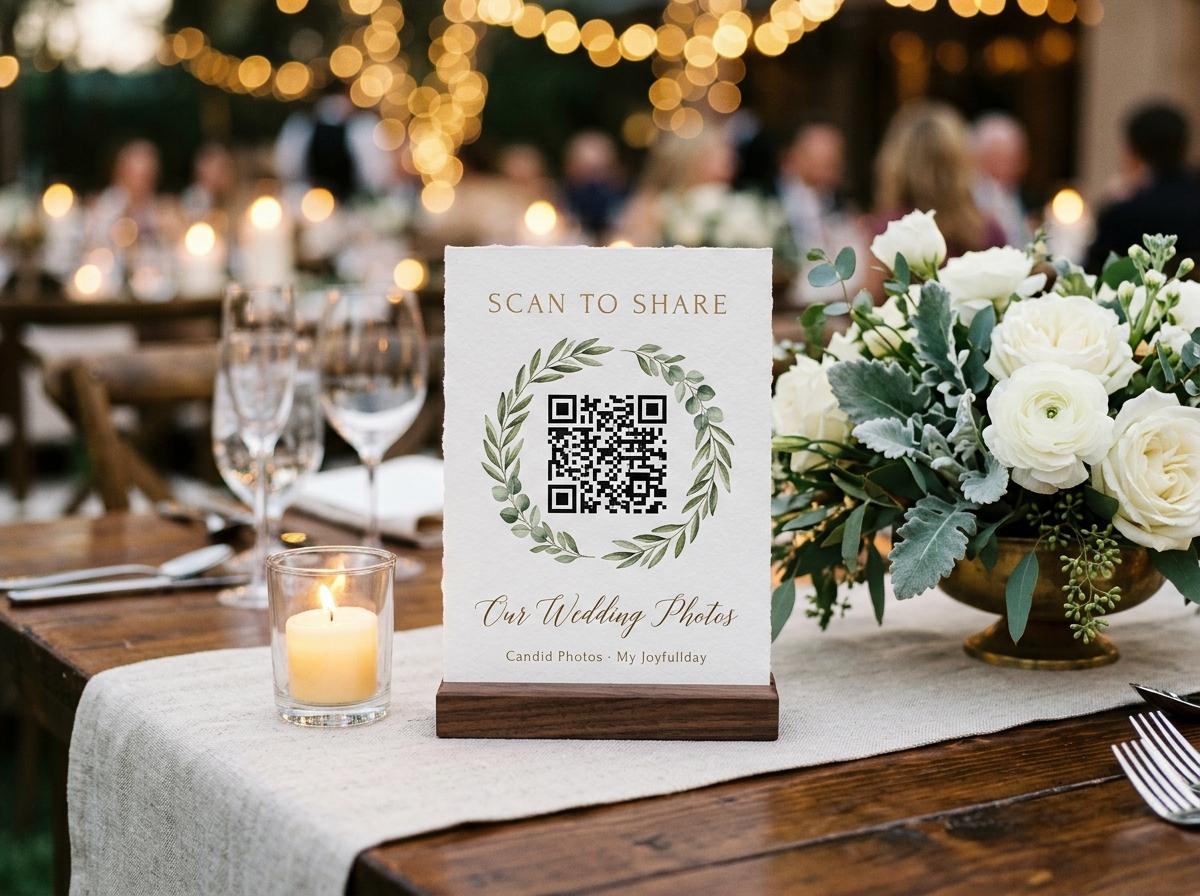
Every collection gets a short web address and a matching QR code. The code is the part that matters on the day: a guest points their camera at it and the upload page opens on their phone, in the browser they already use.
You print the stands and put them out
The dashboard prints four table stands on one A4 sheet. They go on the tables, the welcome sign, the bar, the cake table — anywhere a guest stands with their phone in their hand.
Guests choose their photos and send them
No download, no account, no password to invent at dinner. A guest picks the pictures and clips they took, gives their name so you know whose camera they came from, and presses send. Photos and videos can go in the same submission.
Everything lands in one gallery
You watch it fill from your phone or your laptop. If you turned approval on, nothing is public until you accept it. When the day is done you download the whole collection as one archive, or take individual files.
Notice what is missing from that list: nobody installs anything, nobody creates a login, and nobody has to remember to do it later. The whole thing happens inside the two minutes a guest is already sitting at the table looking at their phone.
What a shared collection holds
- Photographs
- The file your guest chose, kept as it was on their phone. A thumbnail is drawn in the browser for the gallery grid, which is why a large image does not slow the page down; the original is what you download.
- Video clips
- Short or long, from the same picker. Where a group chat squeezes a clip down to something unwatchable, the collection keeps the file the camera made.
- Contributor names
- Each submission carries the name the guest gave you, so you can go back to the person who took the photograph you cannot live without.
- Guestbook messages
- Written wishes from the same link, and recorded video messages on the plans that include them. They sit beside the photographs rather than in a separate app nobody opens twice.
- A room slideshow
- A second address that plays the collection on the venue's screen or projector while the event is running, using only the pictures you have approved.
- A closing date
- Every plan keeps a collection online for a stated period, and you get warning mail before anything is removed. That date is the reason to download while the party is still fresh in your mind.
The photographs you are missing are not the ones nobody took. They are the ones somebody took and never sent.
Before, during and after
Before
Put the link where people look
Add the address to the invitation or the event page, and print the QR stands for the tables. Guests who like to prepare will send a photograph before the day — a message from someone who cannot come, a picture of the outfit — and it lands in the same collection as everything else.
During
Let the room feed itself
This is the window when sharing actually happens. Somebody at table four notices the stand, uploads three pictures, and mentions it to the person next to them. By the time the speeches start, the slideshow on the wall is playing photographs the room took twenty minutes earlier.
After
Chase nothing
Late contributors still have the link, and a reminder can go out to anyone who has not sent anything. Then you download the archive once, keep it wherever you keep the rest of your photographs, and the collection closes on its own.

What it costs, and what changes with the plan
Event photo sharing is not free to run — photographs and video have to be stored somewhere, and the whole collection has to survive until you download it. What you pay for is capacity and time, not the ability to upload. Guests never pay anything and never see a price.
- Preview · free
- One collection, 20 photographs, up to 10 contributing guests, online for 7 days. Enough to test the idea on a real event, too tight for a wedding. It takes no video and no downloads, so treat it as a rehearsal.
- Gather · $19
- 200 photographs and 30 videos, unlimited contributors, a written guestbook, downloads, six months online. Built for birthdays, graduations, baby showers and smaller gatherings. The live slideshow and the video guestbook are one-off add-ons here.
- Celebrate · $39
- 750 photographs and 100 videos, video guestbook and live slideshow included, original-quality downloads, twelve months online. This is the one most couples choose.
- Keepsake · $69
- 2,000 photographs and 300 videos, two years online, premium gallery themes and room for extra people to help manage the collection. For an event you want to hand to your children.
The limit that catches people out is the number of contributors, not the number of photos
On the free plan only ten guests can send anything. On every paid plan that ceiling is gone, so a hundred people can each contribute without you counting.
Compare the plansSetting your guests up to succeed
The difference between a collection with four photographs and one with two hundred is almost never enthusiasm. It is whether the request reached people at the moment they had their phone in their hand and nothing else to do.
- Put a QR stand on every table, not one at the entrance — a guest will not cross the room for a card they saw once.
- Say the line out loud during the welcome: pictures go in the link on your table, and the room slideshow is playing them.
- Add the address to the invitation or the day's schedule, so the people who are photo-shy in a crowd can send from home that evening.
- Turn on approval if you have any doubt about what arrives, and check it once between the main course and the first dance.
- Tell the photographer what you are doing. A second set of candid frames costs them nothing and gives the room something to watch.
- Download the archive the week after, while you still care, rather than in month five when the link has been forgotten.
One thing worth avoiding: asking guests to email you photographs. It doubles the work and guarantees the shy ones send nothing.
The small decisions that decide how big the collection gets
Two events of the same size, same guest list, same photographer, can finish with a collection of thirty photographs and a collection of three hundred. The difference is rarely enthusiasm. It is usually four decisions made in the week before.
Where the code physically is
A guest uploads what is already in their hand. A stand at the entrance is passed twice; a stand on the table is in front of twelve people for two hours. The bar, the dessert table and the cloakroom catch the three groups who never sat down: the people who arrived late, the people who left early, and the ones who spent the evening standing up.
Whether anything tells them it is working
A guest who sends three photographs and sees nothing happen concludes the page is broken. A guest who sends three photographs and sees them appear on the room screen tells the person next to them. That is the cheapest growth mechanism in event photo sharing, and it only exists if the slideshow is switched on and pointed at something people are looking at.
How the ask is worded
The welcome line on the guest page is read once, by every contributor, at the moment of decision. 'Upload your photos' is an instruction with no reason in it. 'The pictures from the ceremony are on the screen behind us — add yours and we will keep them all' tells a guest what happens to their file and what they get out of sending it.
Whether the person next to them knows
Hosts announce the link once and expect the room to have listened. The room did not. What works is one guest at a table doing it and mentioning it, which is why the first ten minutes after the food arrives matter more than the speeches: that is when people are on their phones anyway, with nothing to do and their photographs still at the top of the recents.
Nobody is going to hunt for your link. The link has to be where their thumb already is.
What good looks like afterwards
The measure of event photo sharing is not the count of files. It is whether, six months later, you can find the photograph you want and say who took it. A collection where every submission carries a name and a timestamp is searchable in a way a group chat never is, and the archive you download is the same set of files your guests sent — which means the album you make, the frame on the wall, and the clip you send to the person who could not come all start from the same place.
It is also the only version that survives contact with real life. Somebody in the room will take a photograph you will never see on any other platform, because they were not thinking about sharing at all — they were thinking about the moment. The job is to make it cost them nothing to hand it over.
Questions people ask before they start
Do my guests need to install an app?
No. The QR code opens a web page in the browser they already have. There is nothing to download, no account to create, and no password to invent while sitting at a dinner table.
Can they send videos as well as photos?
Yes, from the same picker and in the same submission, on any plan that includes video. The free Preview plan is photographs only; Gather takes 30 videos, Celebrate 100 and Keepsake 300.
Who can see the collection?
Only people you give the address to. Guest pages are deliberately kept out of search indexes, and the gallery can be hidden entirely so contributors upload without browsing what other guests sent. If you turn approval on, nothing shows until you accept it.
Are the photos compressed?
The file your guest chose is stored as it arrived. A smaller preview is drawn on their phone for the gallery grid so the page loads quickly, but the download gives you the original — full size on Celebrate and Keepsake, standard downloads on Gather.
What happens when the collection closes?
It comes down on the date your plan states — 7 days on the free plan, six months on Gather, twelve on Celebrate, two years on Keepsake, with add-ons to extend. You get warning emails before anything is deleted, which is your cue to download the archive.
Can I use this for a corporate event rather than a celebration?
Yes. The same link works for a conference, a team day or a school event, and the approval switch is the reason organisations use it: nothing reaches the room screen until somebody has looked at it.
Start a collection and see how fast it fills
Create one in a couple of minutes, print the table stands on a normal printer, and let the room do the rest. The free plan is a real event, not a demo.
Event photo sharing
Put one link on the tables and let everyone contribute.
Create a collection, print the table stands, and the photographs your guests took are waiting for you the morning after. Guests never install anything and never make an account.